
- Background
- The Problem
- The Rebuild
- The Raspberry Pi 1 problem
- Configuration
- Or just run the container
- Conclusion
- Improvements
As shown in some of my earlier posts, I run a fair number of services at home, and I like to measure things. Two of the things I measure are the electricity meters in the basement: one for the house and one for the heating. Both are modern meters with an optical (infrared) interface, and for years a small script has been reading them and pushing the numbers into MQTT, from where the rest of my homelab picks them up for dashboards and the occasional automation.
That script had served me well, but it had reached the end of its life. This is the story of replacing it — and of getting the replacement to run on possibly the least suitable computer I own.
Background
German smart meters speak a protocol called SML (Smart Message Language) over their optical interface.
You clip a cheap IR reader onto the meter, it shows up as a USB serial device (/dev/ttyUSB0), and every second or two the meter sends a little binary message containing its readings.
Each reading is addressed by an OBIS code — for example 1-0:1.8.0*255 is the total imported energy, and 1-0:16.7.0*255 is the current power draw.
My old setup was a Node.js script built around the excellent smartmeter-obis library.
It opened both serial ports, decoded the messages, pulled out the handful of values I cared about, and published them to topics like power/house/total and power/heating/current.
Perhaps forty lines of code.
It worked.
The Problem
It worked, right up until it didn’t. The configuration lived directly in the source: two hardcoded blocks of options, two callbacks, the MQTT topics spelled out by hand. Adding a value meant editing code. Worse, the whole thing was brittle: both meters were initialised eagerly at startup, so if one of them was unplugged the entire service refused to start, and I lost the house readings too.
I also had a nagging suspicion that I was leaving data on the table. The meters transmit more than the four or five values I was cherry-picking, and I had no easy way to see what else was in there.
So I decided to rebuild it properly, with a few goals:
- Resilient: one offline meter must not take the others down.
- Configurable at runtime, not in code, and saved to a file.
- Self-describing: show me every value a meter sends, and let me pick which ones go to MQTT.
- Byte-for-byte compatible with the old MQTT output, so nothing downstream would notice the swap.
The Rebuild
I rewrote the whole thing in Python.
The result is a small package called smlgw (the imaginatively named “SML gateway”), and it is on GitHub.
Decoding SML
The interesting part is the protocol.
Rather than depend on a decoder I did not fully understand, I wrote a small, self-contained SML parser: the transport framing (those 1b1b1b1b escape sequences and the CRC), the recursive type-length encoding, and the extraction of OBIS values with their scaler and unit.
Crucially, I also wrote an SML builder — an encoder — which means the test suite can synthesise perfectly valid meter frames and feed them through the decoder.
The entire pipeline can be exercised without any hardware, which turned out to matter a great deal (see below).
There are now 92 tests, and they simulate the meters and mock MQTT end to end.
One subtlety became a feature.
The old library quietly divided energy values (in watt-hours) by 1000 and published them as kilowatt-hours.
If my rewrite had “correctly” published watt-hours, every energy figure in my history would have jumped by a factor of a thousand overnight.
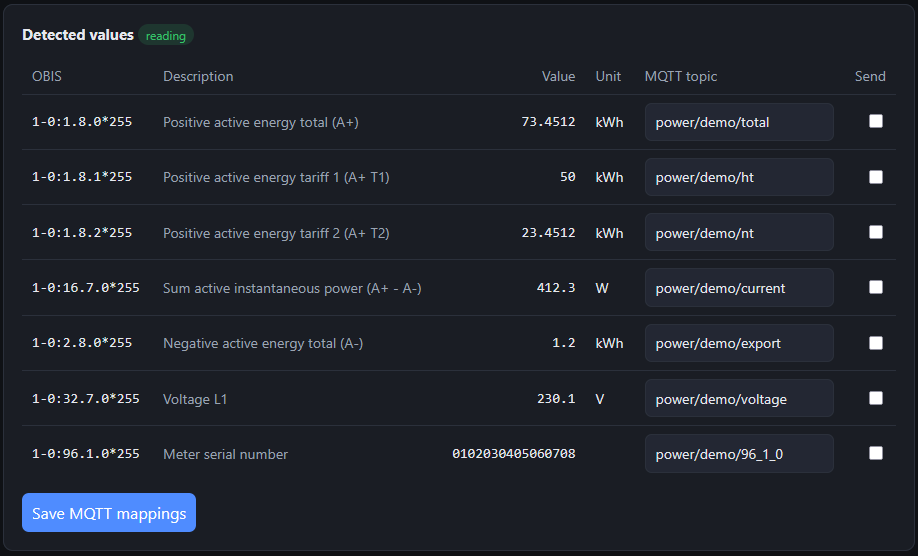
Rather than hardcode the old quirk, I made the output unit configurable per value in the meter settings: energy defaults to kWh (so 1-0:1.8.0*255 still comes out as 73.4512, and my existing graphs never noticed the change), but a dropdown lets me switch any reading to Wh, MWh, W, kW, and so on.
Sensible defaults for the lazy, a choice for the picky — and my years of graphs stay intact.
A web interface
The headline feature is that there is no more editing code.
smlgw serves a small web UI.
It auto-discovers every OBIS value each meter emits, shows them in a table with their live value and unit, and lets me type an MQTT topic next to any of them and tick a box to publish it.
Meters, the MQTT broker, and everything else are configured in the browser and written back to a YAML file.
History and a dashboard
Since I was reading all these values anyway, I decided to store them.
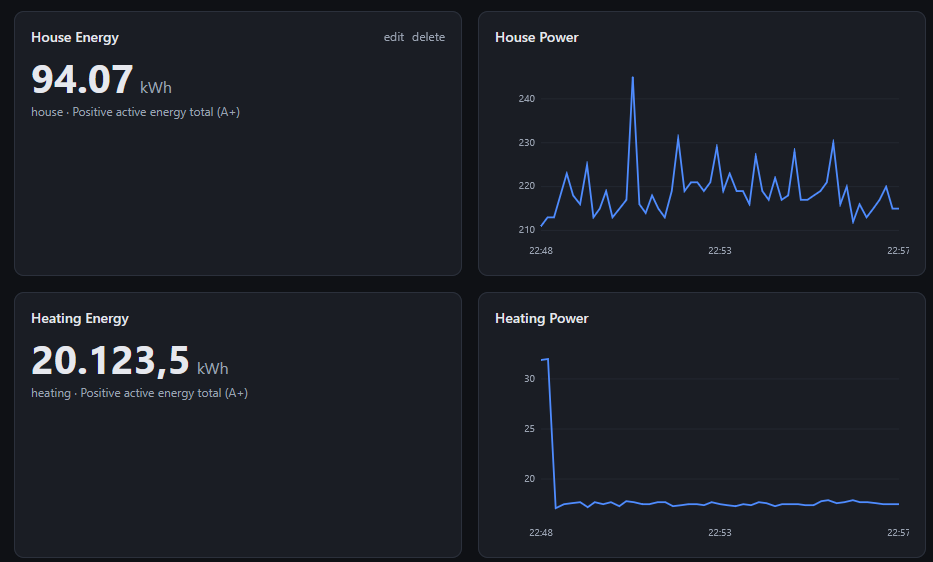
Every numeric reading now goes into a small SQLite database with a configurable retention window, and the homepage is a Grafana-style dashboard you can build yourself: line charts, single-stat numbers, gauges, each bound to whichever meter and OBIS code you like.
The charts are drawn on a plain <canvas> — no heavyweight JavaScript libraries — which, again, turned out to matter.
Recovering a lost PIN
Some meters hide their detailed registers behind a four-digit PIN that you enter through the optical interface itself, by flashing the IR LED — in modern meters you often need a visible spectrum LED — in a specific sequence.
If you have lost that PIN smlgw can recover it: it steps through the candidates, flashing them one by one, and watches the live SML stream for the moment the meter starts reporting real values.
It is slow (seconds per digit), but it is unattended, and it is a much cleaner reimplementation of the shell script I had cobbled together for exactly this situation years ago when my energy supplier was convinced there was no PIN to my meter.
The Raspberry Pi 1 problem
Here is where it got entertaining. The machine bolted next to the meters is a first-generation Raspberry Pi Model B — ARMv6, a single 700 MHz core, 512 MB of RAM, running an Arch Linux ARM install that had not been updated in an embarrassingly long time. Its Python is 3.9.
My first, naive dependency choice was FastAPI.
On a normal machine, pip install takes seconds.
On this Pi, it sat there compiling pydantic-core — which is written in Rust and has no prebuilt wheel for ARMv6 — for what felt like a geological age, before failing outright because the package required Python 3.10.
The fix was to remove the weight entirely.
FastAPI is a thin layer over Starlette, which is pure Python.
So I rewrote the web layer directly on Starlette and swapped uvicorn[standard] (which drags in more Rust and C) for plain uvicorn.
The entire dependency tree is now pure Python — no compilation at all — and it happily supports 3.9.
What had been an install that never finished became one that just downloads a handful of small wheels.
The reward is that the service now starts in a second or two, and — thanks to the resilience goal from the start — when I unplug one meter’s reader, the log prints a calm warning and keeps serving the other. The old script would have been dead.
Configuration
Everything the UI writes ends up in one readable YAML file, so it is easy to back up (there is a download/restore button for exactly that) and easy to put under systemd. A trimmed example:
mqtt:
  host: mosquitto.example.org
  port: 1883

meters:
  - id: house
    name: House
    port: /dev/ttyUSB1
    mappings:
      - { obis: "1-0:1.8.0*255",  topic: power/house/total }
      - { obis: "1-0:16.7.0*255", topic: power/house/current }
Running it under systemd on the Pi is a three-line unit.
The only wrinkle worth noting for fellow Arch users: the serial devices are owned by the uucp group (not dialout as on Debian/Raspberry Pi OS), so the service needs SupplementaryGroups=uucp to open /dev/ttyUSB*.
ExecStart=/home/alarm/smlgw/.venv/bin/smlgw run --config /home/alarm/smlgw/config.yaml
SupplementaryGroups=uucp
Or just run the container
If you would rather not install anything, there is a Docker image.
CI builds a multi-architecture image on every push and publishes it to the GitHub Container Registry, so on a normal machine the whole gateway is a single command — pass the meter’s serial adapters through with --device and point a volume at the config:
docker run -d --name smlgw -p 8000:8000 \
  -v "$PWD/config:/config" \
  --device /dev/ttyUSB0 --device /dev/ttyUSB1 \
  ghcr.io/philippmundhenk/smlgw:latest
And to explore the web interface with no hardware at all, --simulate streams a synthetic meter through the entire pipeline (decode, discover, publish, plot):
docker run --rm -p 8000:8000 ghcr.io/philippmundhenk/smlgw:latest run --simulate
Running it away from the meter
The machine reading the meter and the machine running smlgw do not have to be the same one.
A meter’s port in the config can be a network URL, so a tiny box next to the meter exports its serial port and the gateway — or its container — runs wherever is convenient.
On the box by the meter, ser2net (or a socat one-liner) publishes the port over TCP:
# next to the meter — publish /dev/ttyUSB0 on TCP port 5000
socat TCP-LISTEN:5000,reuseaddr,fork /dev/ttyUSB0,raw,b9600
Then point the meter at that endpoint in the config and run smlgw anywhere on the network:
meters:
  - id: house
    port: "socket://meter-box.local:5000"   # or rfc2217://meter-box.local:5000
smlgw opens these URLs directly (via pyserial’s serial_for_url), so there is no --device passthrough and nothing extra to install on the host running the container — it just needs to reach the box.
Use rfc2217:// if you want the baud rate negotiated over the link; plain socket:// is fine for a fixed 9600-baud SML stream.
USB/IP achieves the same thing one layer lower, attaching the remote IR reader as if it were plugged in locally.
Either way the container never knows the difference — it just opens a serial port that happens to live on the other side of the house.
Conclusion
I set out to replace forty lines of brittle Node with something I would not have to edit every time a meter surprised me, and I ended up with a small, well-tested Python service that decodes the protocol itself, discovers its own data, plots history, recovers PINs, and installs cleanly on a fifteen-year-old Raspberry Pi. Both meters have been reading happily ever since, and the numbers match the old ones to the digit.
If you have a German smart meter and an MQTT broker, it might save you some scripting of your own: GitHub.
Improvements
A few things I would still like to do:
- Home Assistant discovery — publish the MQTT discovery topics so mapped values appear as sensors automatically, instead of configuring them twice.
- Per-value units in the topic payload, optionally, for consumers that want more than the bare number.
- A proper packaged release on PyPI, so the Pi install is
pip install smlgwrather than a clone. - More panel types on the dashboard — a daily/monthly energy bar chart is the obvious next one.
As always, the code is on GitHub, and improvements are welcome.